
Dear colleague
Since the inception of the unitary structure of the NWU, the use of letterheads or other official communication templates such as agendas, fax sheets, etc. which still refer to the institutional office or a specific campus seized. All staff are kindly requested to make use of the correct official templates available in Word, Excel and PowerPoint and not to use older versions. To access these templates, you will have to be logged into the NWU network (by entering your Novell ID and password) to see these documents.
- If the path to the workgroup templates has been set up correctly on your computer, you will be able to access the templates by opening Word, Excel and/or PowerPoint and clicking on File - New
You will see the following:
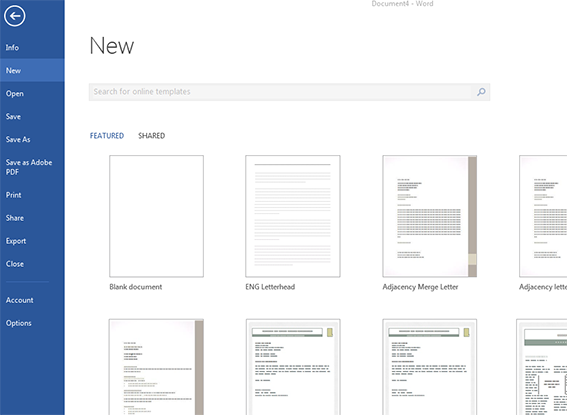
- If you click on 'SHARED' (or on some computers it will display as 'CUSTOM'), you will see folders for Institutional, Mahikeng, Potchefstroom and Vanderbijlpark, containing the types of templates used by each campus. (Most of these templates are the same, but templates such as letterheads, fax sheets etc. have different address details according to campus.)
- All you have to do then is click on the template you want to use, complete the relevant metadata and save the document on your computer.
- If the path to the workgroup templates has not been set up on your computer (and you can't see the above-mentioned), you can set it up yourself by doing the following:
- Open Word, click on File, choose Options, then advanced, scroll down and click on File Locations.
- Select Workgroup Templates, click on Modify and change the path to: f:\apps\office\template, and then click OK.
- Once you have done this setup in Word, the PowerPoint and Excel paths will also be set.
If you have any further inquiries or experience any problems, please contact your relevant IT Helpdesk.